Onboarding Status
Onboarding Status
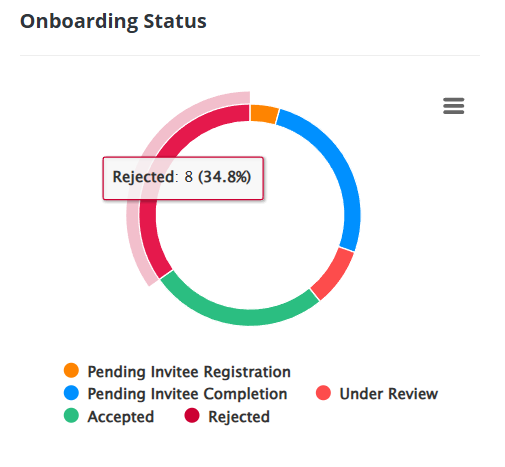
The Onboarding Status Overview section delivers a concise summary of the onboarding stages, offering a clear snapshot of progress across all onboardings. It provides a quick and easy way to track the current status of each onboarding within the process. Here’s how it works:
Filtering by Status
Selecting a specific status will redirect you to the Onboardings section, where the view is tailored to show only onboardings in the chosen status. This filtering ensures that you can concentrate on the most relevant records efficiently
1. Accepted
The green section of the chart indicates all onboardings that been accepted. By clicking on this section, you will be redirected to the onboardings section where only accepted onboardings will be displayed.
The green section of the chart indicates all onboardings that been accepted. By clicking on this section, you will be redirected to the onboardings section where only accepted onboardings will be displayed.
2. Pending Invitee Registration
The orange section represents onboardings where the invitee has yet to register. Clicking on this section will show you a list of onboardings awaiting the invitee's registration.
3. Pending Invitee Completion
The blue section highlights onboardings where the invitee has registered but has not completed the onboarding form yet. Clicking on this section will display these pending onboardings.
4. Under Review
The light red section indicates onboardings that are currently pending internal review for approval. By clicking on this section, you’ll be able to see all onboardings that are in this stage.
5. Rejected
The red section shows onboardings that have been rejected or cancelled. Clicking on this section will redirect you to the Onboardings section, filtered to show only the rejected records.
Related Articles
Onboarding History Graph
Onboarding History Graph User Guide The Onboarding History Graph provides a detailed timeline of onboarding statuses, indicating when each record was assigned its current state. This allows users to track changes and monitor progress over time. This ...Approving an Onboarding Invitation
Approving an Onboarding Invitation This guide provides a step-by-step process for approving onboarding invitations within the Eftsure portal. 1. Access the Onboarding Invitation Log in to the eftsure portal with your credentials. Navigate to the ...Exporting Onboarding Data
Exporting Onboarding Data This guide details the process for exporting onboarding data from the portal. Keep in mind that your ability to export data is determined by your user permissions. Exporting Onboardings Displayed in the Table To export ...Sending an onboarding invitation User Guide
Inviting a New Entity to Onboard on the eftsure Portal To invite a new entity to onboard onto the eftsure portal, follow these steps: Navigate to the Onboardings Tab Click on the "New Onboarding" button. Fill Out the Onboarding Form A form will ...Questions set to show on the onboarding invite form has moved to a dedicated section
Purpose This guide provides instructions for accessing and completing questions displayed on the onboarding invite form when inviting a new entity to onboard. Previously, these questions were displayed in the New Entity Onboarding Invite Form. Now, ...